Avatar Sizing

Tue Aug 14, 2007 2:44 pm

I just put up an avatar and OMG it is huge. What can I do about this? Or is it not huge on anybody elses screen?
Before I learned to brew I was poor, lonely and sober. Now I am just poor.
User avatar
Brewpastor
 
Posts: 29
Joined: Tue Jul 17, 2007 3:10 pm
Location: New Mexico

Tue Aug 14, 2007 3:05 pm

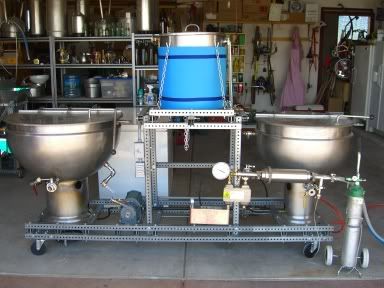
Nice gear. What is the big thing up front?
User avatar
SunkenBier
 
Posts: 476
Joined: Sun Apr 09, 2006 4:09 pm
Location: Rancho Santa Margarita, CA

Tue Aug 14, 2007 3:19 pm

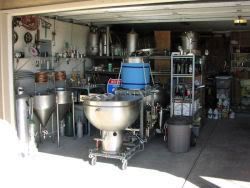
It is the HLT (60 gallon steam jacketed kettle). There is a 40 gallon relative on the other end that serves as my kettle.

Image


Man I need to work on this sizing thing! Help?!
Before I learned to brew I was poor, lonely and sober. Now I am just poor.
User avatar
Brewpastor
 
Posts: 29
Joined: Tue Jul 17, 2007 3:10 pm
Location: New Mexico

Tue Aug 14, 2007 3:25 pm

Hi Brewpastor, You need to resize the picture before uploading it. You'll need to use some sort of picture editing program like adobe PhotoShop. Or I think if you upload it to something like photobucket they provide a link for a resized version too.
"I feel sorry for those who don't drink because when they get up in the morning that's as good as they're going to feel all day."
— Frank Sinatra
User avatar
Lars
 
Posts: 1259
Joined: Sat Jan 21, 2006 10:04 pm
Location: Behind the Orange Curtain

Tue Aug 14, 2007 3:34 pm

Hey, brewpastor, try out bimp. It resizes really easy. Then just re-upload the small version.

http://www.snapfiles.com/get/bimp.gif.html
-- Steve

Kegged: "Old Nimrod" American Barleywine
Kegged: Oatmeal Raisin Cookie Amber
User avatar
linuxelf
 
Posts: 828
Joined: Thu Nov 03, 2005 8:56 am
Location: Charlotte, NC

Wed Aug 15, 2007 7:30 am

If you are using MS Windows you can open a JPG in paint (Start - Run - type "mspaint"). Open the image and click on Image across the top and chose "Stretch/Skew". Change Vert and Horiz to about 50% at first and see what that does. Once you get it to the correct size go to File - Save As... Save it as a DIFFERENT NAME!! If you overwrite the original file you'll not have the large one to mess w/ in the future.
Sergeant, BN Army!

Member of the Mid-State Brew Crew
User avatar
Techie101
 
Posts: 236
Joined: Thu Jun 01, 2006 5:51 am
Location: Tennessee

Wed Aug 15, 2007 7:39 am

Here's a resized one, Brewpastor. Just RtClick, save as, then upload to your image host.

Image
What's on tap: Cream Ale, Imperial Blonde
Secondary: British Amber,
Primary: APA
http://bubrew.org
User avatar
DannyW
 
Posts: 1950
Joined: Wed Mar 08, 2006 6:37 pm
Location: Nokomis, Florida, USA

Wed Aug 15, 2007 12:57 pm

thank you very much. I am now resized, lean, mean and ready to roll. Or something like that...
Before I learned to brew I was poor, lonely and sober. Now I am just poor.
User avatar
Brewpastor
 
Posts: 29
Joined: Tue Jul 17, 2007 3:10 pm
Location: New Mexico

Next

Return to Support

Who is online

Users browsing this forum: No registered users

A BIT ABOUT US

The Brewing Network is a multimedia resource for brewers and beer lovers. Since 2005, we have been the leader in craft beer entertainment and information with live beer radio, podcasts, video, events and more.